|
Thank you for visiting.
Click here for the Japanese(日本語) version
I'm Kitao Nakamura, the developer of the PC Engine emulator "Ootake."
This article is a follow‑up to my previous piece,
“Thinking Seriously
About Pixel Aspect Ratios in Games.”
Last time, I focused
mainly on the theory.
This time, I actually visited several game
centers (arcades that still have CRT cabinets)
to see how
each place is adjusting their screens in practice.
Within the range of locations I was able to visit:
Shops that
opened in or after the 2000s generally used what I'll
call the "MAME style,"
stretching the image
to fill the entire 4:3 screen.
Long‑running
arcades from the 1990s tended to favor
"aspect‑ratio‑conscious"
adjustments, leaving black borders at the
edges.
Let's take a closer look at how each of these
approaches actually sets up the image.
The "Fill‑the‑4:3‑Screen" MAME Style Used
in Game Centers Opened
After 2000
Since the year 2000—and especially by around 2005, when YouTube
and Nico Nico Douga had just begun—videos of games played on
MAME (an emulator for arcade PCBs) started circulating widely
online.
Because there are far more MAME‑captured videos
than recordings from actual arcade boards, the MAME look
gradually became the "standard" aspect ratio that many
people came to assume was correct.
The MAME style of
screen adjustment ignores the black‑border information
output by the original hardware and simply stretches
the image to fill the entire 4:3 screen.
At first
glance, this full‑screen presentation feels pleasant
because it uses every inch of the display.
However,
many games end up with distorted character proportions,
meaning players are seeing something different from what the
graphic designers originally intended.
↓When the aspect ratio is off, the difference in how
the game feels
to play is far from small. In
this scene, even the sense of being trapped
inside the frame dragon changes noticeably.
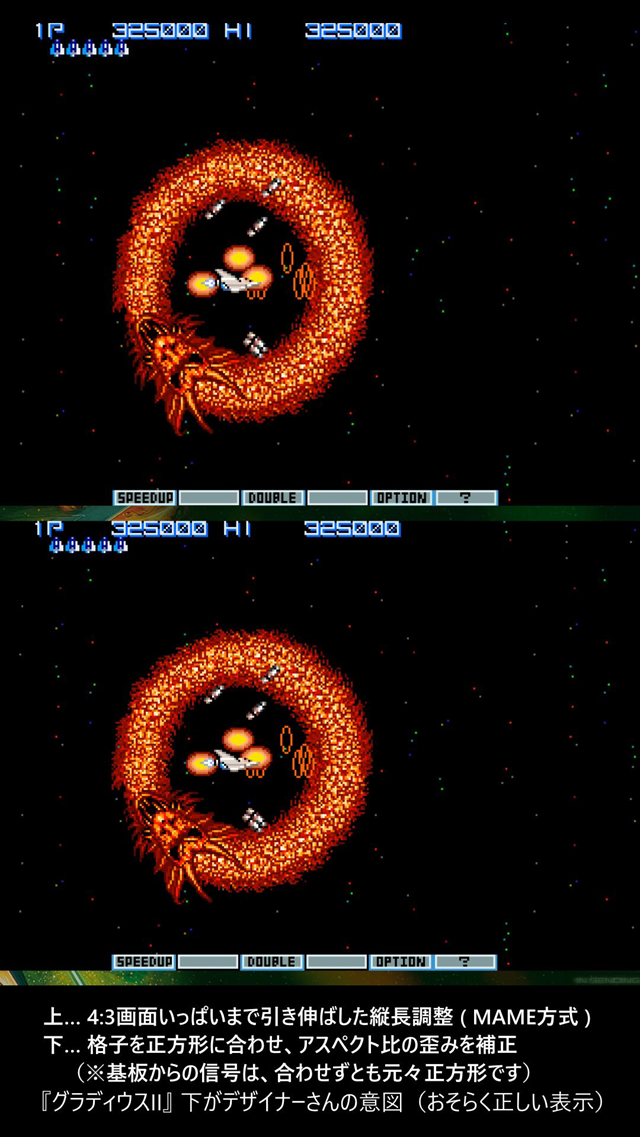
Source:『Gradius: Origin Collection』(©
Konami Digital Entertainment)
↓The "Covered Core"(the Stage 7 boss), with its cute,
rice‑ball‑like appearance.
When the image is
stretched to fill the entire 4:3 screen, only the vertical cover
becomes elongated, which looks unnatural.
While
playing, the difference in how naturally it rotates becomes
quite
noticeable.
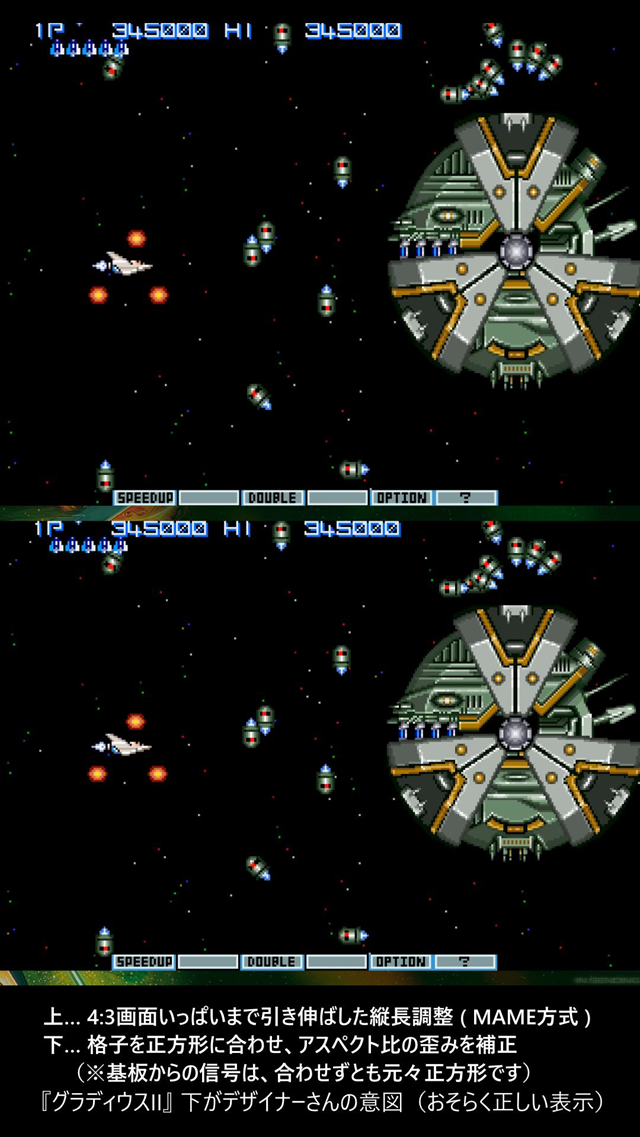
Source:『Gradius: Origin Collection』(©
Konami Digital Entertainment)
MAME‑style adjustments do have some advantages.
- Staff
can simply stretch the image to the edges of the screen without
thinking too much about it, which reduces their workload.
-
Newer staff members can also learn this method quickly.
For arcade operators, this contributes to lowering operational
costs.
But with this approach, the artwork that
designers carefully crafted ends up being distorted.
In the next section, I'll examine the black borders at the
edges of the screen, which serve as a guiding aid for the
designers' intentions.
|
Black Borders: The Unsung Heroes That Keep Characters From Distorting
Even in shops that adjust most of their cabinets using the
MAME style, there were a few exceptional cases where certain
games were set up with proper black‑border adjustments.
↓One of those exceptions was this cabinet running Star
Force.
If you stretch this game to fill the
entire 3:4 (vertical) screen, the image
becomes
obviously too tall, and the staff likely noticed this.
So instead of forcing the upper black border to disappear, they
adjusted it
to the correct aspect ratio—making
the test grid pattern a perfect square.
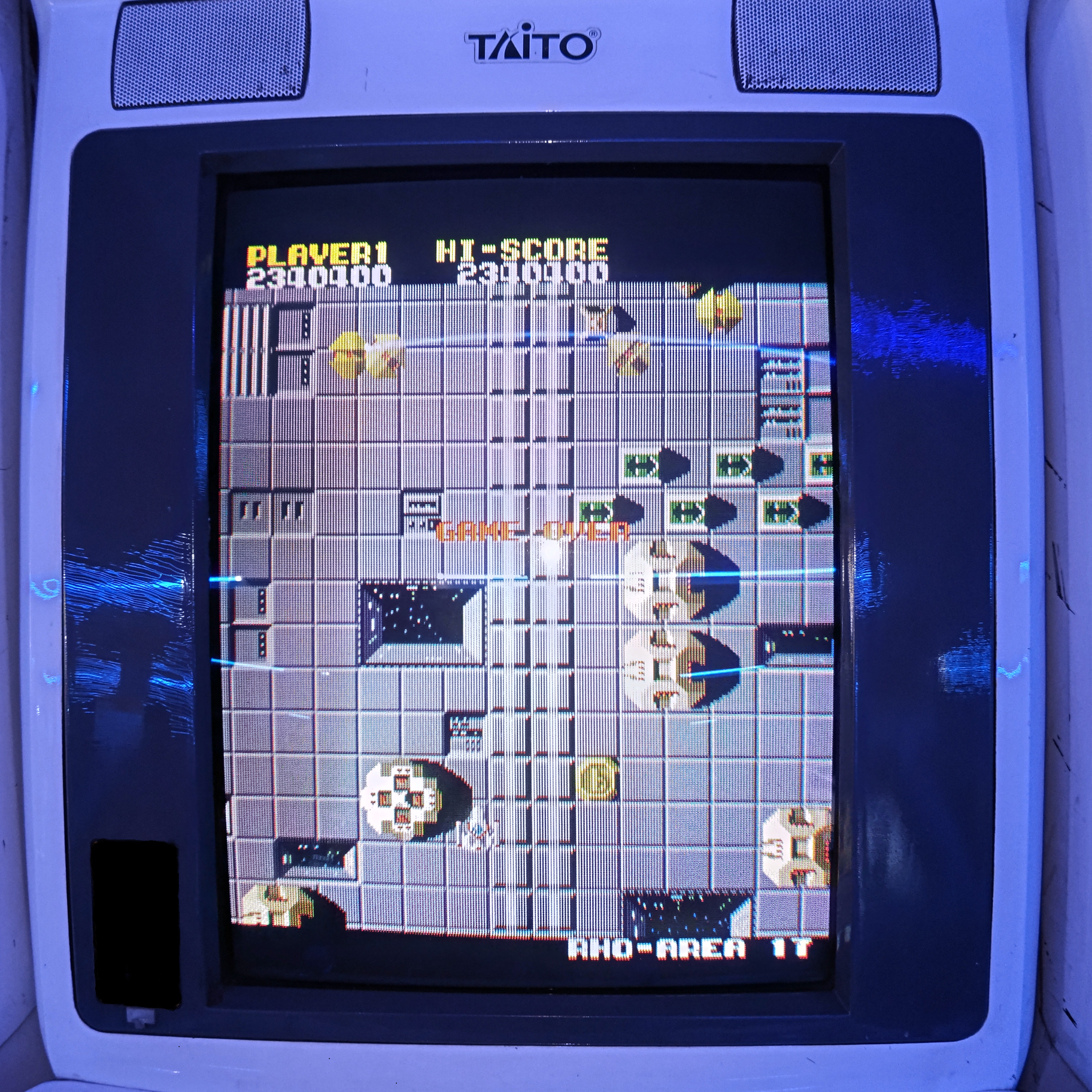
Source:『Star Force』 (©Tehkan) Click
the image to view a larger version.
I've seen people on social media and message boards insist,
quite firmly, that "there were never any black borders — filling
the entire 4:3 screen was the correct look."
However,
as the photos above show, multiple arcades did in fact
use black borders.
Because the area from
the edge of the CRT to the bezel appears as one continuous shade
of black, players using arcade cabinets would almost
never notice whether black borders were present or not.
That's why many people simply don't remember them and
confidently claim, "There were no black borders."
(But in
this situation, asserting that one remembers the absence of
black borders is, realistically, a very difficult claim to
support.
As you can see, black
borders did in fact exist. In the 1980s in particular, CRT
performance was far inferior to what we have today, and the
edges of the screen were prone to distortion.
For that
reason, most arcade PCBs avoided using the outermost
areas of the display and left them as black borders.
- Technically, the hardware could output 320
horizontal dots → but because the edges distorted,
only 288 dots were used as the actual display area.
- Technically, it could output 240 vertical dots
→ but due to edge distortion, only 224 dots were used.
This is why so many 1980s arcade games list resolutions such
as 320×224, 288×224, or 256×224 in their specifications
In cafés and candy shops, frequent screen
adjustments weren't practical, so it's reasonable to assume they
avoided stretching the image all the way to the edges and
instead left some black borders intact.
(because the
visible display area of a CRT can shift significantly during
transport or over time)
In the next chapter,
I'll examine why instruction manuals for arcade PCBs rarely
included detailed, step‑by‑step guidance on how to fine‑tune CRT
adjustments.
|
Aspect Ratio Adjustment: The Unspoken Rule That Circles Stay Circles
and Squares Stay Squares
CRT televisions used a test pattern called a monoscope pattern
to adjust the aspect ratio (the vertical‑to‑horizontal
proportions).
Broadcast stations also displayed these
test patterns during early‑morning off‑air hours.
↓An example of a classic monoscope pattern, composed of elements
such as
perfect circles and square grid cells.
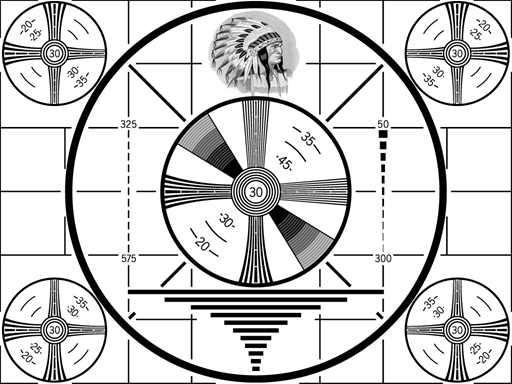
By carefully watching the screen and turning the adjustment knobs
until the circles appeared perfectly round and the
grid cells perfectly square, you could set the display to
the correct aspect ratio.
There were arcade PCBs at the time that displayed
circular or grid‑based adjustment patterns during startup,
and many games offered a crosshatch grid in their test mode for
screen calibration.
↓"Strikers 1945 II" by Psikyo
A message
instructs the operator to adjust the screen until the circle
appears
perfectly round.
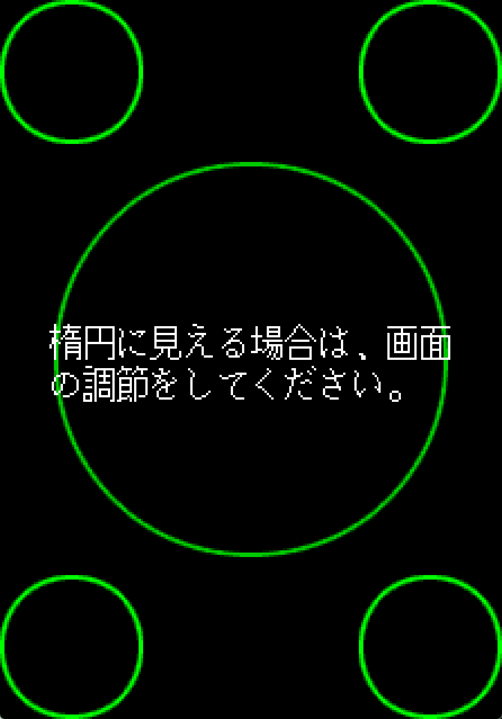
Source:『Strikers 1945 II』 (© Psikyo)
↓Grid pattern from "Xevious".
There
likely wasn’t enough memory available to display a circle.
When this grid is adjusted so that each cell is a perfect
square, in‑game
graphics appear undistorted —
the PCB’s output was square‑pixel to begin with.

Source:『Windows 95/98 version of
Xevious (publisher: MediaKite)』(© Bandai Namco Entertainment
Inc.)
Aside from Psikyo's games, which use a circular pattern for
alignment, it seems that no arcade PCB manuals provided detailed
instructions on how to adjust the aspect ratio.
In the
materials I've reviewed, I haven't found any manuals that give
concrete directions such as "match this to a perfect square" or
"stretch the image to the screen edges."
After searching
through various sources, I finally found one example that comes
close: a Sony CRT television manual that includes a relevant
description.
↓Instruction manual for Sony's "WEGA" CRT televisions
The section on vertical and horizontal size controls explicitly
shows a diagram
instructing the user to correct
an ellipse into a perfect circle.
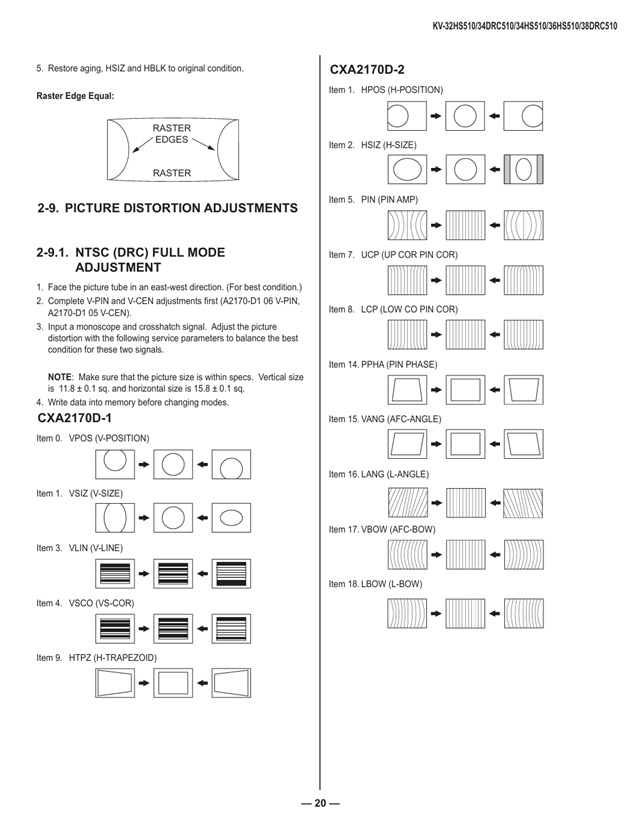
Source:『WEGA Instruction Manual』 (©
SONY)
From what I've seen, instruction manuals for
other televisions simply state "correct any distortion," without
explaining the specific method of adjustment.
The phrase
"correct distortion" also includes correcting
vertical‑to‑horizontal stretching—that is, adjusting the aspect
ratio.
Because ensuring that circles appear as
circles and squares as squares has long been an unspoken
standard practice in television imaging, manufacturers
likely felt no need to spell out the procedure in detail.
As I wrote in the previous article, there is one
exception: the grid pattern on Capcom's CPS hardware. Even if
you adjust it so that each cell appears perfectly square, the
aspect ratio still does not match. I plan to cover the details
of this in a separate article at a later time.
|
To Preserve the Appeal of These Classics
for Future Generations
Both then and now, the way arcade cabinets are adjusted varies
from place to place, and each game center sets its own standards
at its discretion.
For example, with the original
"Ghosts'n Goblins", I sometimes see machines in modern arcades
where Arthur has become noticeably wider than intended.
The Arthur I remember from table‑type cabinets and candy shops
back in the day was definitely slimmer.
When I
come across a distorted "Gradius II" or "Ghosts'n Goblins", I
can’t help feeling that it's a shame—the designs lose their
intended form. I also suspect that revenue
might even improve if the aspect ratio were adjusted correctly;
a properly proportioned demo screen would likely encourage more
people to drop in a 100‑yen coin.
Many modern
re‑releases on contemporary game consoles also seem to rely too
heavily on MAME as a reference. YouTube is filled with
arcade‑game footage that has been stretched to fill a
4:3 frame.
For works that designers crafted with
such care, this is far from an ideal situation.
If the
gaming world approached aspect‑ratio decisions with the same
seriousness seen in television, film, or manga, I believe the
culture of games could become something even more beautiful than
it is today.
There was, however, one encouraging
sign. Among owners of original PCBs—particularly for
titles like the Gradius series—most did not stretch the
image to fill the entire 4:3 frame. Instead, they played using
what appears to be the aspect ratio intended by the designers.
- You can find examples of this by searching video sites
for terms such as
"GradiusII PCB."
YouTube検索:「GradiusII
PCB」 YouTube検索:「グラディウスII 基板」
Although this article contains several remarks about the 4:3
display behavior seen in MAME, none of them are meant as
criticism of MAME itself. MAME is, needless to say, an
outstanding emulator. The aspect‑ratio issue has been discussed
repeatedly—especially overseas—so I look forward to seeing how
it may continue to improve in the future.
There was a
time when "video games" were often looked down upon, and even
today that sentiment lingers in some places. But I
believe games are a wonderful cultural medium—one that deserves
to be preserved and passed down properly, just like
film or manga.
I intend to continue examining this
aspect‑ratio issue with sincerity. If I can gather more
conclusive evidence and broader support, I would be glad to
share the findings with developers and arcade operators as well.
|
2026.3.21 Written by Kitao Nakamura.
The previous article
Please also see
"Thinking Seriously
About Pixel Aspect Ratios in Games."
In that article, I discuss
the evidence showing that many arcade PCBs output square‑pixel signals,
as well as methods for calculating pixel aspect ratios.
"Ootake" Homepage へ 戻る
This page is link free. このページはリンクフリーです。
Copyright(C)2006-2026 Kitao Nakamura.  Twitter(X)始めました
|
|
 A
Continued, Thinking
Seriously About
A
Continued, Thinking
Seriously About