|
Thank you for visiting.
Click here for the Japanese(日本語) version
My name is Kitao Nakamura, the developer of the PC Engine emulator
"Ootake."
This article will inevitably end up praising Ootake a
bit,
but it's not driven by some shallow "look how amazing my
implementation is" kind of motive
(though I certainly don't mind if
people appreciate it).
If someone wants to enjoy PC Engine titles
today but can't play them on original hardware,
I genuinely believe
that Ootake offers the closest experience
without compromising
the quality of the games.
I've always been
concerned that playing in a low-accuracy environment can diminish
the strengths of these works.
By writing about the inner workings
of Ootake like this, I hope it will help raise
the overall level of
the emulator scene, even if only a little.
I plan to cover
several topics over the coming installments.
This time, the focus is
on color reproduction.
In developing Ootake, I connected real PC Engine hardware to
both CRT televisions
and modern LCD monitors, studied the
output until I practically wore holes in my eyes,
and implemented
the color reproduction based on
what I understood to be the
original developers' intentions.
As far as I know,
Ootake is the only emulator whose default settings are based
directly on
how colors actually appear through the real hardware's
composite and RF output.
Including commercial re-release hardware and software, most
other PC Engine emulators are
built on the assumption of displaying
output from a PC Engine modified for RGB.
As a result,
their colors differ significantly from what you see through
the real
hardware's composite or RF output.
So, which one represents the
original, intended look?
RGB Mods and Expansion-Bus RGB Output Use Uncorrected Signals
By modifying a real PC Engine to tap the RGB signals
directly from its internal chips and adding an RGB output port,
you can connect it to any display that accepts RGB input.
However, when you use this kind of modification, the
resulting image ends up showing colors that differ quite a lot
from the PC Engine's original appearance.
↓Ootake's default display. It closely matches the
familiar look of real hardware's
video output.
— There were also many televisions of that era that had
somewhat paler
colors than this, due to
considerable unit‑to‑unit variation.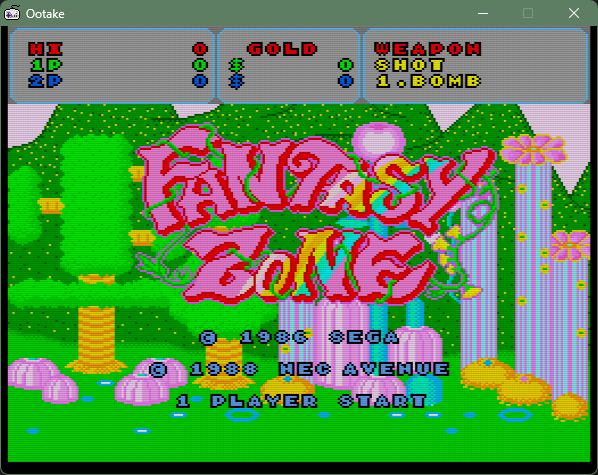
Note: Colors may appear different in some PC browsers.
For accurate color reproduction, please save the image
and view it in Paint.
Ootake setting: Default
Source: "Fantasy Zone" (© SEGA, © NEC
AVENUE)
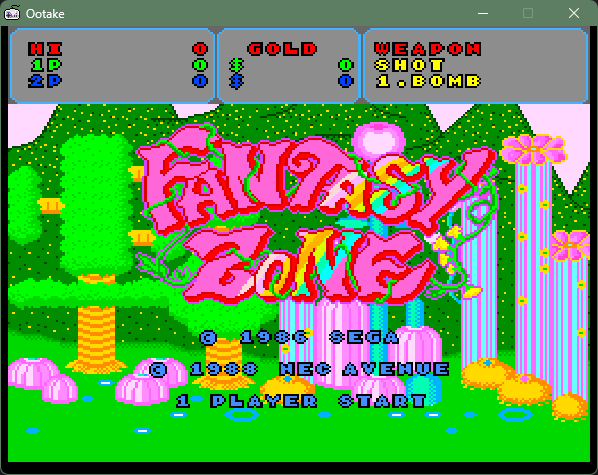
↓Displayed with Ootake set to approximate a modified RGB‑output
unit.
The red tones become stronger, giving the
image a more primary‑color look.
Because the
contrast is too high, the overall color balance appears overly
harsh and garish.
In the PCE
version of "Fantasy Zone", this difference becomes critical.
Note: Colors may appear different in some PC browsers.
For accurate color reproduction, please save the image
and view it in Paint.
Ootake setting:
Gamma 0.94 , Brightness +30 ,
Non-Scanlined
Source: "Fantasy Zone" (© SEGA, © NEC
AVENUE)
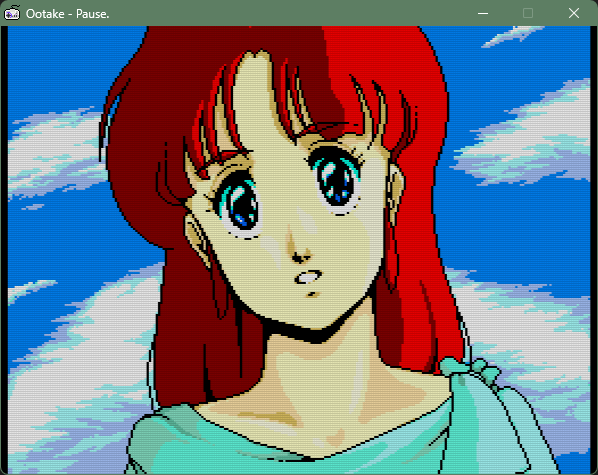
↓Ootake’s default display. It has a
familiar vibe, close to the video output of
real
hardware.
Lilia in the Ys II opening. Even the
“shadowed skin tones” in the darker areas
still
remain recognizably skin-colored.
Note: Colors may appear different in
some PC browsers.
For accurate color reproduction, please save the image
and view it in Paint.
Ootake setting: Default
Source: "Ys I・II " (© Falcom © Konami Digital
Entertainment)
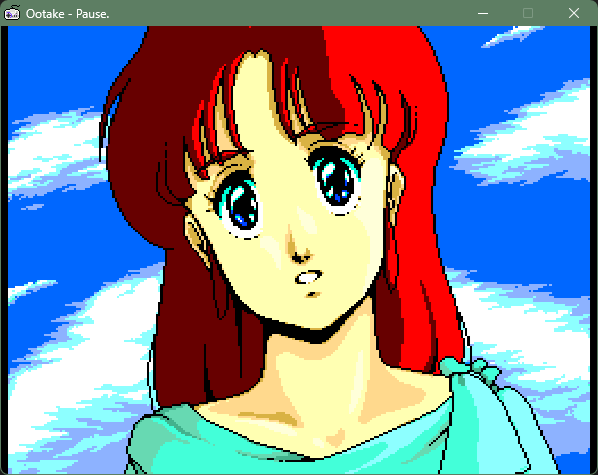
↓Ootake set to a configuration similar to many other emulators.
Reds appear more intense.
Unlike real hardware,
the shadowed areas sink too dark, causing skin tones
and hair colors to look dull.
Note: Colors may appear different in
some PC browsers.
For accurate color reproduction, please save the image
and view it in Paint.
Ootake setting: Gamma 0.94 ,
Brightness +30 , Non-Scanlined
Source: "Ys I・II " (© Falcom © Konami Digital
Entertainment)
Because RGB output looks sharp and clean, many people have
assumed it to be "correct" without noticing the color
differences.
The same applies to modifications
that extract RGB signals from the rear expansion bus; without
proper adjustment, the resulting colors will differ from the PC
Engine's original appearance
On real PC Engine hardware, the video is originally displayed
through the following process:
Internal RGB signals → Converted into
TV‑compatible video signals (colors are altered in this step) →
Composite/RF output
However, on an RGB‑modded unit:
Internal RGB signals → Output directly
as RGB with their original, unadjusted color values
Because the RGB output bypasses the
color‑adjustment stage, what you see is the raw RGB
signal rather than the PC Engine's intended color
appearance.
The first PC Engine emulator ever
created, "VPCE" — developed by a programmer in Germany — was
implemented based on the color output of an RGB‑modded PC
Engine.
For roughly sixteen years after Ootake's release,
nearly all subsequent emulators and commercial re‑release
hardware also followed this RGB‑modded color baseline.
About sixteen years after Ootake introduced a color reproduction
closer to real hardware, users of the FPGA‑based MiSTer platform
began noticing the differences from actual PC Engine units and
implemented settings that move the colors closer to
real‑hardware accuracy.
In the next chapter, we will
explore why, for so many years, most emulators continued to
use colors that differed from those of real Japanese PC
Engine hardware.
|
Why So Many Emulators Continued Using Colors That Differ from
Real
Japanese Hardware
Why were the first PC Engine emulators — "VPCE" and, a few
months later, "Magic Engine" — implemented with colors that
differed from real Japanese hardware?
The reason is that
in Europe, NEC's officially released PC Engine models were
extremely rare.
Most users imported Japanese PC Engine
units and purchased them already modified with RGB output
ports, making RGB‑modded consoles the de facto standard in that
region.
The creator of "VPCE" was from Germany, and
the creator of "Magic Engine" was from France. It is highly
likely that the hardware they owned were Japanese PC Engine
units that had already been modified with RGB output.
The
reason is that NEC's officially released European PC Engine
models operated at 50Hz, which caused Japanese games to run in
slow motion.
Both of these emulators were designed to
run at 60Hz — the same refresh rate as Japanese PC Engine
hardware — rather than 50Hz.
In France in particular,
consumer televisions commonly included RGB (SCART) inputs as a
standard feature. Because of this, Japanese PC Engine units
that had already been modified for RGB output were routinely
sold in many game shops.
It is also plausible that
the German creator of "VPCE" took advantage of this French
market and imported not only the console but even a compatible
television.
Since these RGB‑modified PC Engine units were
effectively the mainstream option in Europe, it was only natural
that early emulators ended up reproducing colors that
differed from those of real Japanese hardware, which relied on
composite or RF output.
Several factors likely contributed to why this situation
persisted for so many years, even among Japanese emulators,
including commercial ones:
- The developers' own PC
Engine units may have been RGB‑modified consoles.
- Many
developers never directly compared the colors of real hardware
with those of their emulators.
- Because most emulators
shared the same RGB‑based color tone, it was widely assumed to
be correct without further verification.
- Even with
inaccurate colors, games remained fully playable; darker color
reproduction rarely caused issues severe enough to hinder
gameplay.
As a result, many games end up being played
with colors quite different from what their original designers
intended, preventing the true appeal of their artwork from
being fully appreciated.
There are, in fact,
several PC Engine titles that have been unfairly judged due to
this lack of accurate color reproduction. In the next
chapter, we will take a closer look at these misunderstandings
and explain them in detail.
|
Fantasy Zone's Beautiful Real‑Hardware Colors, and
Gradius's
Not‑So‑Dark Appearance
As shown in the images
from the first chapter, the PC Engine version of
Fantasy Zone can look noticeably harsher and more toxic in color
when played with the default settings of emulators other than
Ootake.
Because of this, it is not uncommon to see
reviews claiming that the PC Engine version has "bad colors."
One review written in the early 2000s had a particularly
strong influence. For a time, people hostile toward the PC
Engine would repeatedly link to that article on a major Japanese
anonymous online forum and use it to disparage the PCE version
of Fantasy Zone.
The problem was that the review relied
on emulator screenshots that did not reproduce real‑hardware
colors, declaring that "the colors are wrong," and then
listened to heavily degraded emulator audio and concluded that
"the sound is terrible."
In reality, both
judgments were based on inaccurate reproduction rather than the
actual capabilities of the hardware.
Looking back at
reviews and user impressions from that era, there were no
complaints about the colors at all. The screenshots printed
in manuals and magazines consistently showed a clean and
attractive-looking Fantasy Zone.
As for the sound, it is
true that people occasionally mentioned being disappointed that
the whistle in Stage 1 was missing.
However, many players
also appreciated the strengths of the other stage themes, and at
the time there were no widespread criticisms or reviews harshly
attacking the audio.
It is unfortunate that, years later,
some people began repeating negative claims without verifying
the facts, simply echoing what they saw online.
This
kind of uncritical bandwagon criticism can easily lead to unfair
evaluations taking root.
On the other hand, here is a review from 2020 of the PC
Engine mini, published by GAME Watch.
"PC Engine mini: Full Title Review –
Fantasy Zone" (GAME Watch)
In
it, the reviewer writes:
- "The colors are slightly
different, but the screen layout is almost identical to the
arcade version."
- "It doesn't come across in screenshots,
but the BGM feels a bit underwhelming."
While reviewing
Fantasy Zone as it appears on the PC Engine mini, the author
also reflects on the original PCE version:
"At the
very least, to me at the time, the image on my home TV looked
almost the same as the arcade version."
The
difference lies only in the color reproduction of the PC Engine
mini, not in the reviewer's original memory.
Their
impression from back then was not mistaken at all.
As for the sound, the PC Engine mini unfortunately has
several inaccuracies in its audio reproduction—for example, the
noise‑based drums can be overly sharp and distracting.
In
Fantasy Zone, these issues stand out even more, to the point
that the mini fails to convey the simple, charming sound of the
original PCE version.
To help clear up these
misunderstandings, I hope to share audio samples from Ootake or
real hardware on X when the opportunity arises.
Other titles that feel visually off unless played on real
hardware or Ootake include games like "Gradius" and "Dungeon
Explorer."
On most general-purpose emulators, these games
appear extremely dark, with colors that look dull and washed
out.
↓Ootake default display. The overall look is close to the
familiar video output
of real hardware.
Although darker than many other games, it is not excessively
dark and
actually creates a nice atmosphere.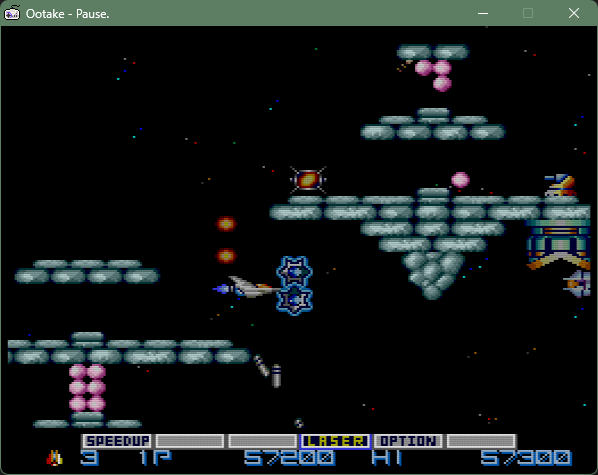
Note: Colors may appear different in some PC browsers.
For accurate color reproduction, please save the image
and view it in Paint.
Ootake setting: Default
Source: "Gradius" (© Konami
Digital Entertainment)
↓Ootake set to a configuration similar to many other
emulators.
The overall image looks darker.
The player ship's gray, as well as ground enemies and items, all
appear
somewhat dull.
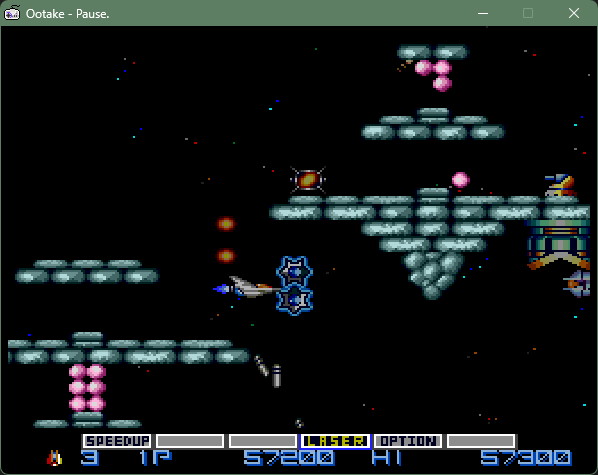
Note: Colors may appear different in some PC
browsers.
For accurate color reproduction, please save the image
and view it in Paint.
Ootake setting:
Gamma 0.94 , Brightness +30 ,
Non-Scanlined
Source:
"Gradius" (© Konami Digital
Entertainment)
In many other games as well — such as the Ys, Tengai Makyo, Valis,
and Cosmic Fantasy series — comparing elements like skin tones
and the smoothness of sky gradients reveals color differences
that are too significant to ignore.
In the next chapter, I will explain how Ootake
reproduces the colors of the Japanese PC Engine — the colors
originally intended by the designers.
|
How to Reproduce the Colors of the Japanese PC Engine
— the
Colors Intended by Its Original Designers
So then, how can we bring the colors closer to those of real
hardware?
Around five years ago, an overseas enthusiast
succeeded in extracting and digitizing the correction values
used when converting the PC Engine's internal RGB signals into
composite or RF video output.
Displaying an emulator's
screen using raw RGB data alone is less accurate than applying
these correction values.
With the correction applied, the
resulting image indeed becomes much closer to the look of a real
Japanese PC Engine — as well as to Ootake's color reproduction.
However, even with these correction values applied,
the result still differs somewhat from "the final colors."
This is because, on real hardware, the correction values are
followed by an additional conversion into analog video signals.
After that, the signal passes through the television's own
brightness‑adjustment circuitry before finally appearing on the
screen.
In contrast, Ootake has focused on
reproducing "the final colors" from the very beginning
— ever since its earliest version released twenty years ago.
More concretely, Ootake is built on the following
principles:
- Never place colors arbitrarily;
always preserve the overall balance.
- Ensure that
color adjustments do not break games that are
particularly sensitive to color tone, such as "Fantasy
Zone", "Gradius", or "Dungeon Explorer".
- Compare
the output against real hardware as closely as
possible, adjusting until the overall atmosphere feels right.
- Televisions of that era had lower contrast than modern
digital displays, partly to prevent dark scenes in movies or
video content from becoming completely black.
As a result,
darker areas tended to appear somewhat brighter compared
to today's TVs.
- Because early televisions varied
widely in their factory calibration, with significant
unit‑to‑unit differences in color tone, it is impossible to
define a single "correct" color.
This is something that must
be kept firmly in mind from the start.
Based on these principles, the actual implementation
followed the guidelines below:
- Use sRGB as the
foundation for the overall color balance.
- Adjust
the gamma curve to prevent dark areas from sinking too deeply,
aiming for a look that is both close to real hardware and easy
to view.
- Do not rely on a single hardware‑and‑TV
combination; instead, verify the results across multiple real
setups. * I also frequently visited retro game shops to
study the colors on their in‑store demo TVs.
Through this kind of repeated trial and error, I gradually
refined the implementation.
The default
settings used by most players are chosen with great
care, so that the intentions of the original creators are
faithfully conveyed to the player.
Because televisions of
that era varied so widely from unit to unit, Ootake also allows
users to make their own adjustments — within a range that does
not break the overall color balance — using the "Gamma" and
"Brightness" menus.
|
To Preserve the Appeal of These Classics for
Future Generations
If the person who wrote that heavily misunderstood review of the
PCE version of "Fantasy Zone" had been using an emulator with
accurate color and audio reproduction, the article likely would
never have turned out the way it did.
When PC Engine
emulators first appeared, simply seeing those nostalgic games
running on a PC screen was enough to excite and move me.
However, as emulators became more widespread, I realized that
low‑accuracy reproduction carried the risk of causing
these games to be unfairly judged.
That
realization became the single biggest reason I decided to
release Ootake.
I wanted to make it available as an emulator
that could faithfully convey the strengths of the original
works.
One thing I personally try to be very careful
about is that digital measurements, if taken in the wrong way,
can easily lead to incorrect implementations.
For that
reason, I believe the best approach is to verify reality
through analog observation and use digital data
only as supporting evidence.
Since the
ultimate goal is for the emulator's output to match that of real
hardware, the most reliable method is simply to place
the two screens side by side and compare them directly.
If any differences appear, I revisit the data — and then confirm
the results again through analog observation.
Without this
cycle of repetition, a highly accurate emulator cannot be
achieved.
It isn't an easy task, but with the hope that
these classics will continue to be enjoyed in their true form, I
will keep refining Ootake.
|
2026.2.6 Written by Kitao Nakamura.
"Ootake" Homepage へ 戻る
|
 The
Hidden Pitfalls of PC Engine RGB Output
The
Hidden Pitfalls of PC Engine RGB Output Twitter(X)始めました